

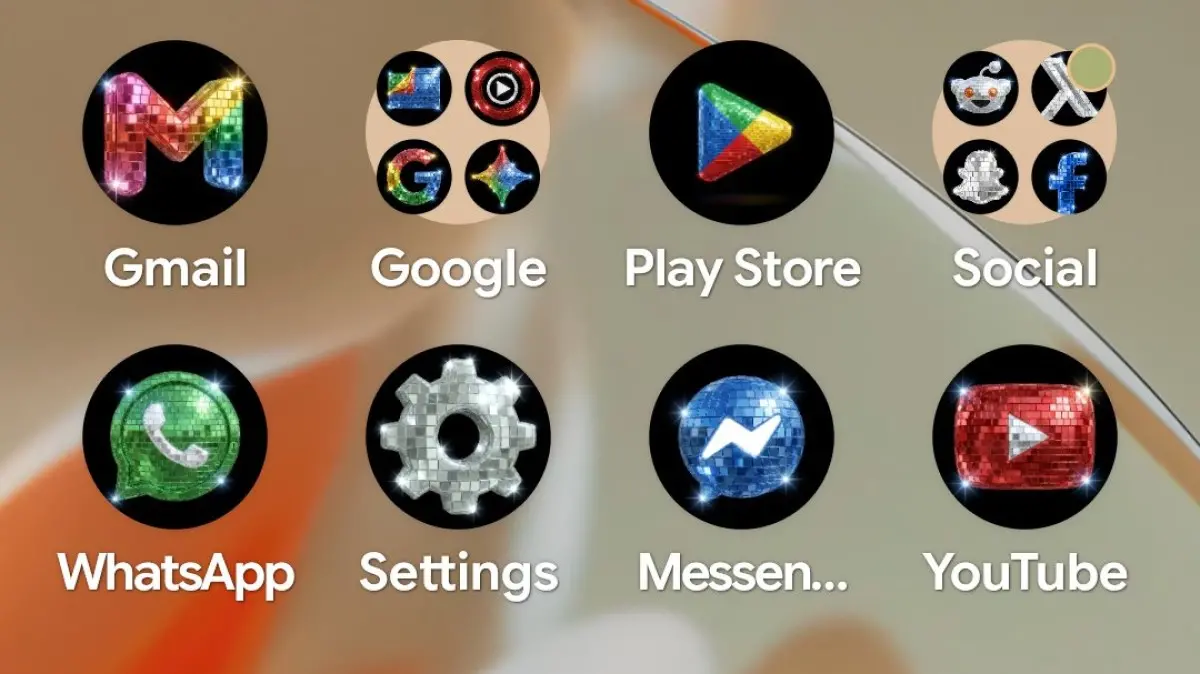
Disco has found itself mired in controversy for longer than many smartphone users have probably been alive — ask your parents about Disco Demolition Night. So it probably shouldn’t have been any surprise that Spotify users’ reactions to the app’s (temporary) new disco ball icon were mixed, at best. Where some people see controversy, others see opportunity, and Google’s rounding this week out by just leaning in to the disco icon fad as hard as it possibly can.
Key Facts
- Disco-ified versions of popular app icons have gone viral in recent days, starting with designs by Pixly’s Race Johnson.
- Android head Sameer Samat teased the possibility of an official icon pack earlier this week.
- Google has now made the disco icons official as a custom style for the Pixel Launcher.
- Users have already created elaborate home screen themes, including the 'Sisko Frisco Disco Fresco' by Dieter Bohn.
- The feature leverages the Pixel Launcher’s existing custom icon styles system, not a traditional icon pack.
The Birth of the Disco Icon Trend
Late last week, Pixly’s Race Johnson started creating a bunch of disco-ified icons for popular apps. These weren’t just simple tweaks — Johnson applied a shiny, glittery, reflective aesthetic that transformed familiar app logos into miniature disco balls. The designs quickly spread across social media, catching the eye of Android head Sameer Samat. Samat responded with a playful tease on X (formerly Twitter), suggesting that Google might make the icons official. Many executives would leave such a comment as a lighthearted joke, but Google, still riding high on the energy from its recent I/O developer conference, decided to act swiftly.
From Tease to Reality
Just hours after Samat’s initial post, he returned to X to announce that the disco icons were now official. The news came as a surprise to many, as Google typically doesn’t deploy such rapid-turnaround features. The company’s ability to do so lies in the underlying architecture of the Pixel Launcher. As Artem Russakovskii noted, this isn’t a traditional icon pack that requires downloading a separate app. Instead, it’s a new preset for the Pixel Launcher’s custom icon styles. This system, introduced with Android 12, allows users to change the shape, color, and style of their icons dynamically. Adding a disco style simply meant creating a new theme preset, which Google could push as a server-side update.
How the Disco Style Works
Pixel users can access the new disco icons by long-pressing on their home screen, selecting “Wallpaper & style,” and then choosing the “Icons” option. Under the available styles, they’ll now see a glittering disco ball icon. Once selected, all supported app icons on the home screen will adopt the shiny, reflective look. The effect is most striking on apps with simple or colorful logos — such as YouTube, Google Maps, or Spotify — where the disco sheen adds a layer of visual fun. However, the system is not perfect; some third-party apps may not automatically adopt the style, as icon theming depends on developer support for adaptive icons.
User Creativity Knows No Bounds
As soon as the icons went live, users began experimenting with them in outrageous ways. One standout example comes from Google’s own Dieter Bohn, who shared a screenshot of his home screen titled “Sisko Frisco Disco Fresco.” The arrangement combined the disco icons with a deep space wallpaper, likely referencing the Star Trek: Deep Space Nine character Benjamin Sisko. The result was a visually stunning and thematically cohesive layout, free of any Gul Dukat imagery. Bohn’s creation quickly garnered praise for its cleverness and aesthetic appeal.
Other users have posted their own creations, ranging from minimalist setups to full-blown disco-themed home screens with matching widgets and wallpapers. Some have even integrated the icons into retro-style layouts, pairing them with neon or geometric backgrounds. The community response has been overwhelmingly positive, with many praising Google for embracing the trend so quickly.
The Cultural Context of Disco
To understand why these icons have struck a chord, it’s worth revisiting the cultural history of disco. Disco emerged in the 1970s as a genre of dance music characterized by steady beats, syncopated basslines, and orchestral arrangements. It became a global phenomenon, epitomized by artists like Donna Summer, the Bee Gees, and the soundtrack to “Saturday Night Fever.” However, disco also faced significant backlash, culminating in the infamous Disco Demolition Night at Comiskey Park in Chicago in 1979. During that event, thousands of disco records were destroyed in a promotional stunt that turned violent and highlighted racial and cultural tensions. The backlash effectively ended disco’s mainstream dominance, though the genre has experienced revivals in later decades.
Today, disco is often associated with nostalgia, glitter balls, and a sense of carefree fun. The disco ball icon captures that essence, turning a mundane smartphone into a party accessory. Google’s decision to lean into this aesthetic reflects a broader trend in tech design: embracing playfulness and personalization.
Implications for Future Icon Styles
The speed at which Google deployed the disco icons suggests that the Pixel Launcher’s custom icon styles system is far more versatile than previously understood. If Google can push a themed style as a server-side update, it could do the same for other creative styles in the future — seasonal themes, collaborations with artists, or even user-submitted designs. This opens up possibilities for more dynamic and responsive home screen customization, something that Android has long championed over the more rigid iOS approach.
However, the disco icons also highlight a limitation: the system currently only works with apps that use adaptive icons. Older apps or those without proper icon templates may appear unchanged, creating a mixed look on the home screen. Google may need to address this to make future style deployments more seamless.
How to Get the Disco Icons
If you own a Pixel phone (running Android 12 or later), you can access the disco icons right now. Here’s a step-by-step guide:
- Long-press on an empty area of your home screen.
- Tap “Wallpaper & style.”
- Scroll down to the “Icons” section.
- Select the disco ball icon from the list of available styles.
- Enjoy your new sparkling app icons.
Remember that the style applies system-wide to all adaptive icons. You can also combine the icons with a suitable wallpaper for maximum effect. Some users have reported that the icons look best on dark or space-themed backgrounds, as the glitter effect pops against darker shades.
Community Reactions and Future Outlook
The disco icons have sparked a wave of creativity and discussion across tech forums and social media. Many users appreciate Google’s willingness to have fun and respond quickly to community trends. Others have called for more permanent icon pack support, but the custom style system offers a good balance between flexibility and simplicity. As we look ahead, it’s likely that Google will continue to experiment with limited-time icon styles, perhaps tying them to events, holidays, or cultural moments.
Are you digging these disco icons? Can you feel them? Share your home screen creations and let the community know what you think. The disco era may have had its controversies, but on modern Pixel phones, it’s nothing but groovy.
Source: Android Authority News