

Google has officially unveiled Android 17, bringing a host of new features that blend artificial intelligence with practical improvements to everyday smartphone use. Announced during the Android Show ahead of the larger I/O developer conference, the update includes nine major changes that span everything from emoji design to cross-platform file sharing. Here's a comprehensive look at what's coming.
All-New Emoji
Android 17 introduces a complete redesign of its emoji library, affecting all 4,000-plus characters. The new designs shift away from the flat, cartoonish style of previous versions toward a more three-dimensional look with added depth and detail. This overhaul marks a significant visual refresh for the platform, bringing Android's emoji closer in style to those on other operating systems. Pixel phones will be the first to receive the update later this year, with wider availability expected in subsequent months.
Pause Point: A Digital Well-Being Tool
Google's latest digital well-being initiative, Pause Point, aims to reduce mindless app usage. Users can designate certain apps as distracting, and whenever they try to open one, a 10-second timer appears. During this pause, users are offered optional breathing exercises or suggestions for more productive apps. The system also allows setting session timers for individual apps. Notably, disabling Pause Point requires a full phone restart, adding sufficient friction to discourage casual dismissal.
Screen Reactions for Content Creators
To simplify the creation of reaction videos, Google introduces Screen Reactions. This feature lets users record both their front-facing camera feed and the device screen simultaneously, with just a few taps. The user's video appears as a cutout overlay on top of any onscreen content—photos, videos, webpages, or apps. The feature is designed for social media creators and will launch first on Pixel phones in summer 2026.
Expanded Quick Share and AirDrop Compatibility
Building on last year's cross-platform file sharing between Android and Apple devices, Android 17 extends Quick Share support to more Android manufacturers. Xiaomi, Honor, and OnePlus will join the list, alongside Oppo and Vivo. For non-compatible phones, Google is adding a QR code generation feature that iPhone users can scan to receive files via iCloud storage. Later this year, Quick Share and AirDrop support will be integrated directly into apps like WhatsApp, making file transfers even more seamless.
Easier iPhone-to-Android Switching
Apple's iOS 26.3 added wireless transfer capabilities for contacts, messages, homescreen layouts, and eSIMs, but the feature required a compatible Android device to receive the data. Android 17 finally provides that compatibility, starting with Pixel and Galaxy phones. Users moving from iPhone to Android can now transfer all critical data wirelessly, reducing friction during platform migration.
Rambler: AI-Powered Real-Time Transcription
Under the Gemini Intelligence branding, Google introduces Rambler, an advanced real-time transcription tool. It not only removes filler words like "um" and "ah" but also streamlines spoken messages and corrects errors. During a demo, a user dictated a shopping list, changed their mind about bananas, and Rambler automatically omitted them from the final list. The tool supports multiple languages within a single message, making it particularly useful for multilingual users. It will debut on the latest Samsung Galaxy and Google Pixel phones this summer.
Create My Widget: AI-Generated Home Screen Widgets
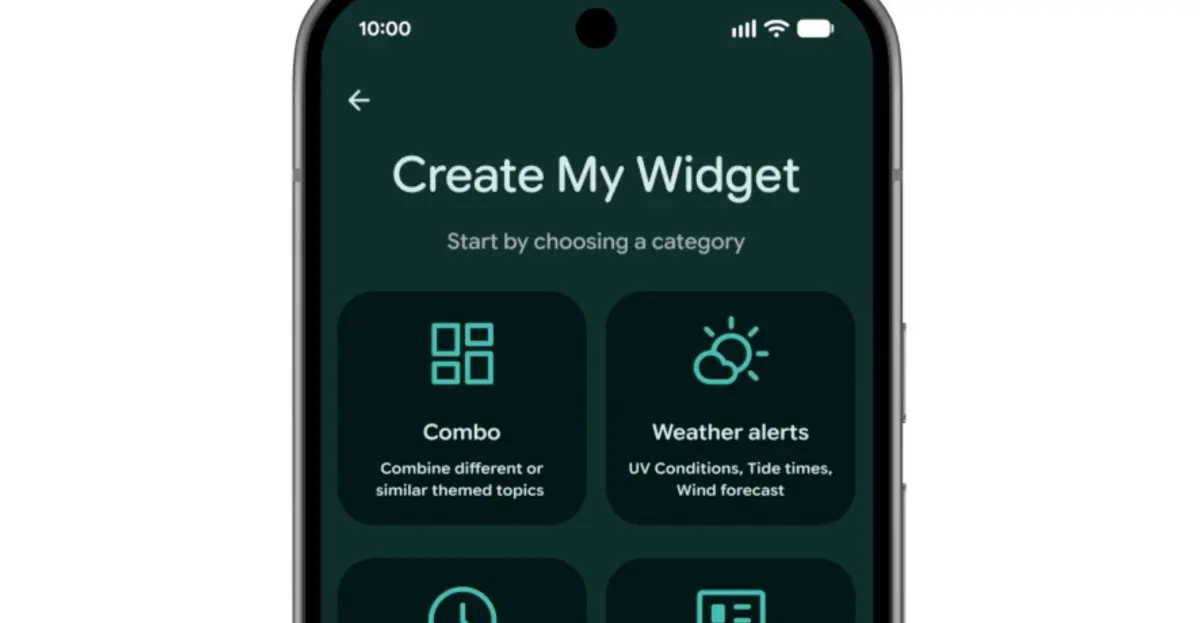
Inspired by Nothing's Essential App widgets, Google's Create My Widget lets users build custom home screen widgets using natural language. Users can request a meal planner that highlights protein-rich recipes, a cycling weather widget showing wind speed and rain, or a live concert feed for a local venue. The feature relies on Gemini AI to interpret prompts and generate functional widgets. It will be available on select Galaxy and Pixel phones this summer.
Gemini Automation Enhancements
Android 17 expands Gemini's automation capabilities beyond food delivery and rideshare apps. New integrations allow Gemini to order groceries from a notes app list, plan travel itineraries from a photo, and fill forms faster through Autofill. Chrome also receives AI upgrades, including auto-browse functionality launching in late June. These updates build on the existing Task Automation framework available on latest Samsung and Google flagships.
Enhanced Security Features
Security receives multiple upgrades in Android 17. A partnership with certain banks helps block spoofed calls from their number, provided the user has the bank's app installed. Improved malware detection monitors app behavior for suspicious activities like SMS forwarding or background launches. Chrome's safe browsing mode now scans APK downloads for known malware. For theft protection, users can enable biometric protection remotely via Find Hub, and the system increases wait times between PIN/ password entry attempts while reducing the number of attempts allowed.
These nine features represent only the highlights of Android 17. The update also includes numerous smaller refinements across notifications, battery management, and accessibility. Most new capabilities will roll out to Pixel and Galaxy phones starting in summer 2026, with wider distribution to other Android manufacturers expected later in the year.
Source: The Verge News